
Home
Free Word Counter – Instant Character Count & Writing Analysis Tool
Getting your text right doesn’t have to be hard. Our free word counter gives you a fast character count and a detailed writing analysis in one click. It’s perfect for 2026 projects where precision is everything. You can check your social media captions or academic essays without ever leaving your browser. It’s simple, private, and always accurate. No more guessing how much you’ve written.
Never lose your count: Press Ctrl+D (or Cmd+D on Mac) to bookmark this free word counter. It stays ready for your next viral post or academic project.
How to Use This Word Counter Tool
- Step 1: Type or paste your text into the editor above
- Step 2: See instant word count, character count, and sentence statistics
- Step 3: Check your writing quality metrics and readability score
Our free word counter logic processes your text locally in the browser to ensure maximum speed and privacy. The tool analyses your text automatically. No clicking, no waiting, no hassle.
📊 2026 Quick Reference Limits
| Instagram Caption | 2,200 Chars |
| TikTok Caption | 4,000 Chars |
| X (Twitter) Post | 280 Chars |
| X (Twitter) Bio | 160 Chars |
Functional Explanation: How it Works
Our free word counter uses a real-time scanning engine. It doesn’t just look at letters. It identifies patterns to separate words from punctuation and spaces. This ensures you get a precise count for professional manuscripts or short social media bios. You’ll see the numbers update with every single keystroke. It is designed to be the most responsive tool in your writing toolkit.
Use-Cases: Who Needs This Tool?
- Social Media Managers: Perfect for staying inside the tight character limits of Instagram and X.
- Students: Essential for hitting exact word count goals on essays and research papers.
- SEO Writers: Helps you keep meta descriptions and titles under the 160-character limit.
- Bloggers: Use it to track reading time and ensure your post is the perfect length for your audience.
Features vs Benefits
This free word counter offers specific features that lead to better results. For example, our “live counting” feature means you never have to wait for a page to reload. This saves you time during heavy editing sessions. Another benefit is our writing analysis. By seeing your sentence count and paragraph structure, you can fix complex text before you hit publish.
Common Problems This Tool Solves
- Post Truncation: Stops your captions from getting cut off by the “Read More” button.
- Academic Rejection: Ensures you don’t lose points for being under the word count limit.
- Privacy Anxiety: Unlike other sites, we don’t store your drafts. Your work stays on your screen.
- Formatting Errors: Cleans up hidden spaces that mess up your character counts.
Manual Counting vs Our Tool
Counting by hand is slow and full of errors. Even built-in processors like Word or Google Docs can be clunky when you just need a quick check. This free word counter is faster because it removes the fluff. You don’t need to open a heavy application. Just paste your text and get the data you need in less than a second.
Trust and Safety Signals
Your privacy is our priority. This free word counter processes all text locally in your browser. This means your data never reaches our servers. We do not track, store, or sell your writing. You can use this tool for confidential work or private messages with total peace of mind. It is fast, lightweight, and completely secure for 2026 users.
Why Use This Free Word Counter?
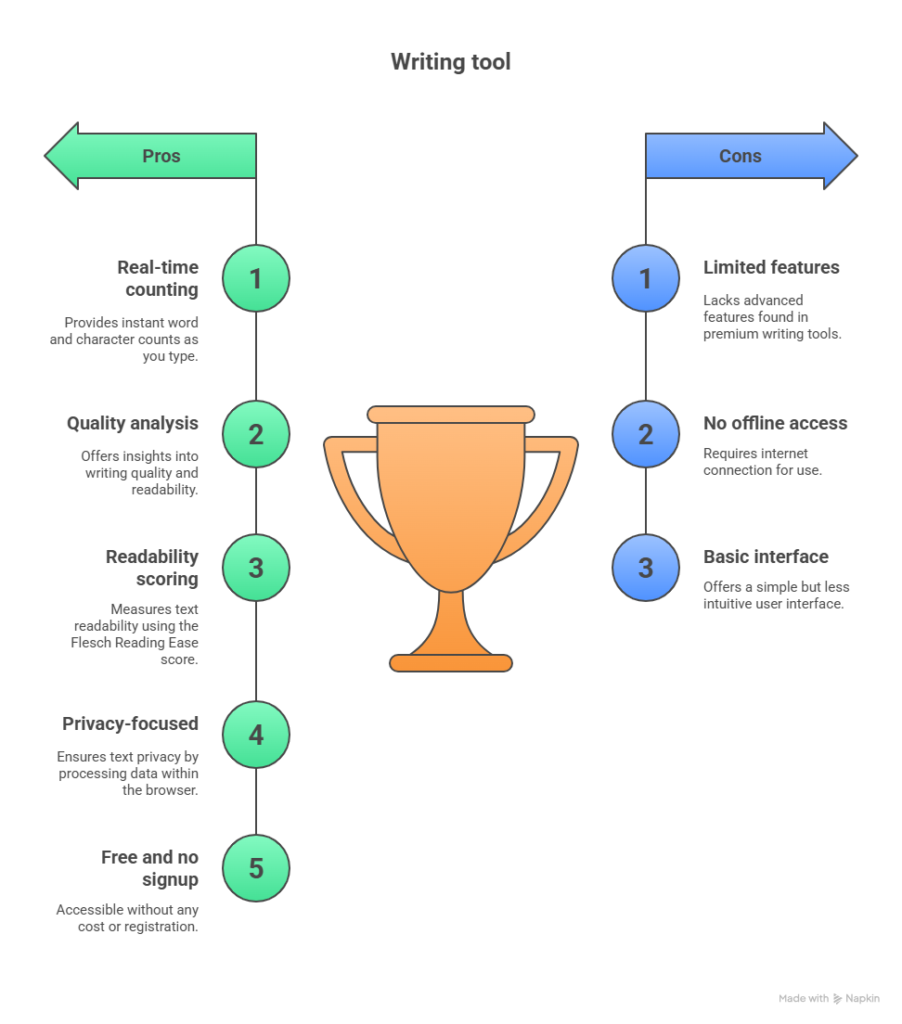
Not sure which writing utility fits your workflow? We analysed the top options recommended by the community. Read our full review of the best free word counter tools for 2026 to see how we compare to others in accuracy and privacy.
Get Accurate Counts Instantly
You need exact numbers for assignments, blog posts, and social media. This word counter tracks every metric in real-time:
- Total word count
- Character count (with and without spaces)
- Sentence and paragraph count
- Reading time and speaking time
- Average word length
Improve Your Writing Quality
Most word counters just count. This tool analyzes your writing and shows you how to make it better.
Writing Quality Metrics:
Average Sentence Length – Tells you if sentences are too long. Good writing keeps sentences under 20 words. Readers lose focus when sentences drag on.
Passive Voice Detection – Catches weak passive constructions. Active voice makes writing stronger and clearer. Aim to keep passive voice under 10%.
Adverb Counter – Flags unnecessary “-ly” words. Too many adverbs weaken your prose. Strong verbs beat adverbs every time.
Complex Word Percentage – Shows if you’re using too many difficult words. Simple language reaches more readers. Complex words above 20% hurt readability.
Grade Level Score – Reveals reading difficulty. Most web content performs best at 8th grade level or below. Higher scores mean fewer people will read it.
Check Readability in Seconds
The Flesch Reading Ease score tells you how easy your text is to read. Scores range from 0 (very difficult) to 100 (very easy).
What the scores mean:
- 90-100: Very Easy (5th grade level)
- 80-89: Easy (6th grade level)
- 70-79: Fairly Easy (7th grade level)
- 60-69: Standard (8th-9th grade level)
- 50-59: Fairly Difficult (10th-12th grade level)
- 30-49: Difficult (college level)
- 0-29: Very Difficult (professional/academic)
Most successful blogs and articles score between 60-70. News sites aim for 50-60. Academic writing can go lower.
Track Keyword Density for SEO
Writing for search engines? Check how often your target keyword appears.
Enter any keyword and the tool shows you:
- How many times it appears
- Keyword density percentage
- Whether you’re over-optimizing
SEO best practice: Keep keyword density between 1-2%. Higher than 3% looks spammy to Google.
Find Overused Words
The Most Common Words section shows which words you repeat too often.
Good writers vary their vocabulary. If you see the same word appearing 10+ times, find synonyms. Your writing will sound more professional.
When You Need a Word Counter Tool
For Students and Academic Writing

Your professor sets a word limit. You need to hit it exactly.
Essays, research papers, and assignments all have strict requirements. Going under loses points. Going over gets content cut or penalized.
This word counter keeps you in the safe zone. You’ll know exactly where you stand as you write.
For Bloggers and Content Writers

Content briefs specify word count ranges. A product review might need 800-1,000 words. A comprehensive guide could require 2,000+.
Track your progress in real-time. You’ll know if sections need expanding or trimming before you submit.
For Social Media Managers

Every platform has different character limits:
- Twitter/X: 280 characters
- Instagram caption: 2,200 characters (first 125 show without “more” button)
- Facebook post: 63,206 characters (engagement drops after 40)
- LinkedIn post: 3,000 characters
Social media managers rely on this free word counter to stay within the 2026 character limits for TikTok and Instagram captions. No manual counting. No guesswork. Just accurate results.
Check your character count before posting. No more cut-off messages or wasted captions. For a complete breakdown of every platform’s specific rules, read our Social Media Character Limits Guide (2026).
For Copywriters and Marketers
Ad copy has strict space limits:
- Google Ads headline: 30 characters
- Meta description: 155-160 characters
- Email subject lines: 50 characters (mobile cutoff)
Every character counts when you’re writing for conversions. This tool helps you stay within limits while maximizing impact.
For Authors and Novelists

Most novels run 70,000-100,000 words. Short stories usually hit under 7,500 words.
Track your daily word count goals. Many successful authors write 1,000-2,000 words per day. Seeing your progress keeps you motivated.
Word Count Guidelines by Content Type
Blog Posts:
- Quick tips: 300-600 words
- Standard posts: 1,000-1,500 words
- In-depth guides: 2,000-2,500 words
- Ultimate resources: 3,000+ words
Academic Papers:
- High school essay: 300-1,000 words
- College essay: 1,500-5,000 words
- Research paper: 3,000-10,000 words
- Thesis: 15,000-50,000+ words
Business Content:
- Email: 50-125 words
- Press release: 300-500 words
- White paper: 3,000-5,000 words
- Case study: 500-1,500 words
Books:
- Flash fiction: Under 1,000 words
- Short story: 1,000-7,500 words
- Novella: 17,500-40,000 words
- Novel: 70,000-120,000 words
Not sure how long your content should be? For a deep dive, read our full analysis on Blog Post Word Count SEO Strategies
Understanding Character Count vs Word Count
Word count measures the total number of words. Used for essays, books, and most writing assignments.
Character count measures every letter, number, space, and punctuation mark. Used for social media, meta descriptions, and SMS.
Some systems count spaces, some don’t. This tool shows both so you’re always prepared.
Twitter counts spaces. Google Ads count spaces. SMS systems sometimes don’t. Always check which version matters for your platform.
Text Formatting Tools
Need to change your text case? Use these quick actions:
UPPERCASE – Makes every letter capital. Good for headlines and emphasis.
lowercase – Makes every letter small. Useful when text is accidentally in all caps.
Title Case – Capitalizes The First Letter Of Each Word. Perfect for headlines and titles.
Sentence case – Capitalizes the first letter of each sentence. Standard for body text.
After changing case, you can undo with one click if it’s not what you wanted.
Want more advanced text case options? Check our Case Converter Tool for additional formatting styles.
Pro Tips for Better Writing
Keep sentences short. Aim for 15-20 words per sentence on average. Shorter sentences are easier to read on screens.
Cut adverbs. Search your text for words ending in “-ly.” Most can be deleted or replaced with stronger verbs.
Use active voice. “The dog chased the ball” beats “The ball was chased by the dog.” Active voice creates energy.
Vary sentence length. Mix short punchy sentences with longer ones. This creates rhythm and keeps readers engaged.
Read your work aloud. If you stumble while reading, your readers will too. Rewrite anything that doesn’t flow smoothly.
Check your grade level. If you’re writing for a general audience, aim for 8th grade or below. Simpler writing reaches more people.
Frequently Asked Questions
Start Writing Smarter Today
Whether you’re writing an essay, creating a blog post, drafting ad copy, or working on a novel, this free word counter gives you the insights you need. Paste your text now and see instant results. No signup required. No download needed.
Aspiring ebook author? Use this free word counter tool to track your chapters—our team used it while writing the Family Wealth Gap Guide you’ll find below.
Use the tool above to get started.
Advanced Writing Tips
- Track your writing speed. Time yourself and check your word count after 15 minutes. Most writers produce 500-800 words per hour. Knowing your speed helps with deadline planning.
- Set daily word count goals. Consistent small progress beats sporadic bursts. Write 300 words daily and you’ll finish a 90,000-word novel in 300 days.
- Use the reading time estimate. If your blog post takes 10+ minutes to read, break it into multiple posts. Most readers prefer content they can finish in 5-7 minutes.
- Monitor your improvement. Check your readability score on old vs new content. As you improve as a writer, your scores should trend toward your target range.
- Don’t write to hit a number. Word count is a guideline, not a goal. If you explain something well in 800 words, don’t pad it to 1,500. Readers hate fluff.
Tool Features Summary:
- ✓ Real-time word and character counting
- ✓ Writing quality analysis
- ✓ Readability scoring (Flesch Reading Ease)
- ✓ Passive voice detection
- ✓ Adverb counter
- ✓ Complex word analysis
- ✓ Grade level calculation
- ✓ Keyword density checker
- ✓ Most common words tracker
- ✓ Text case converter
- ✓ Reading and speaking time estimates
- ✓ 100% free, no signup required
- ✓ Privacy-focused (text never leaves your browser)
Need more than just a count? Our Social Media Character Limits Guide (2026) breaks down the optimal lengths for engagement on every major platform.


