
You spend twenty minutes writing the perfect post. You hit publish and half your message gets cut off. It is a frustrating moment that every creator knows well.
In 2026, social media character limits are more important than ever because they affect how algorithms rank your content. For example, Instagram allows 2,200 characters while TikTok has expanded to 4,000 for search optimization.
📌 Save this 2026 Guide: Press Ctrl+D (or Cmd+D) to bookmark.
This guide gives you every social media character limit across major platforms for 2026. No fluff. No guesswork.
Social Media Character Limits Cheat Sheet (2026 Updated)
| Platform | Post/Caption Limit | Bio/Profile Limit |
| 2,200 Characters | 150 Characters | |
| TikTok | 4,000 Characters | 80 Characters |
| Twitter / X | 280 (Free) / 25k (Premium) | 160 Characters |
| 63,206 Characters | 101 Characters | |
| 3,000 Characters | 120 Characters |

Why Character Limits Still Matter in 2026
Social media platforms use limits to keep feeds scannable. Most users scroll fast and short posts usually perform better than walls of text. Limits also push you to focus on quality over quantity. They force you to get straight to the point. Finally, they protect the user experience. Nobody wants to scroll through a five thousand word rant when they are just checking for updates.
But here is what most guides will not tell you. The maximum limit is not always the optimal limit. Data shows that posts hitting about 80 percent of the limit often get the most attention. You are not just writing for a robot. You are writing for humans with short attention spans. If you need to write something much longer, it is often better to link to a dedicated blog post. You can check our guide on concrete slab cost 2026 to see how long-form authority content should look.
Twitter/X Character Limits: Bio, DMs, and Posts
X is still the home of punchy content. If you use the platform for business, you know that every letter counts. For standard users, the limit is 280 characters. If you pay for X Premium, you can write up to 25,000 characters.
The x profile bio character limit is strictly 160. If you go just one character over, your bio will not save. Your twitter dm character limit 2025 is much higher at 10,000 characters to allow for long networking chats. Also, keep in mind the x display name character limit is 50 characters.
| Feature | Character Limit | Optimal Length |
| Standard Post | 280 characters | 71-100 characters |
| Premium Post | 25,000 characters | 200-400 characters |
| Direct Message | 10,000 characters | 100-200 characters |
| Bio | 160 characters | 130-150 characters |
| Alt Text | 1,000 characters | 100-200 characters |
Key Insight: Tweets under 100 characters get 17 percent more engagement. People love to retweet content that is quick and easy to read.
Instagram Character Limits
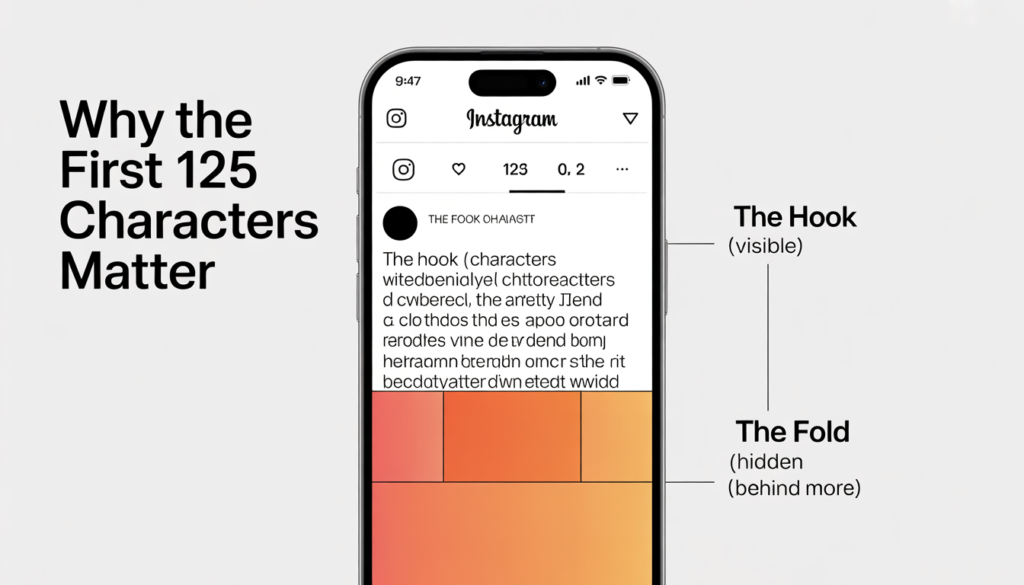
Instagram is mostly about the photo, but the caption tells the story. You have a lot of room, but the “fold” is very short.
| Feature | Character Limit | Optimal Length |
| Caption | 2,200 characters | 125-150 characters |
| Bio | 150 characters | 130-145 characters |
| Hashtags | 30 hashtags | 5-10 hashtags |
| Story Text | No strict limit | 1-2 lines visible |
| Reels Caption | 2,200 characters | 100-150 characters |
Key Insight: Only the first 125 characters show before the “more” button pops up. Your hook must be in those first two lines or people will keep scrolling. Managing social media character limits on Instagram means knowing exactly where that fold starts and it is ultimately the secret to mastering social media character limits on Instagram.
TikTok Caption Limit 2026: The Search Engine Shift
TikTok is no longer just a video app. It is now a massive search engine. Because of this, the TikTok caption character limit has moved to 4,000 characters for 2026. This gives you space to add keywords and long descriptions. This helps the TikTok SEO algorithm find the right audience for your videos. Use our online word counter to ensure you are utilizing this space without going over the cap.
| Feature | Character Limit | Optimal Length |
| Video Caption | 4,000 characters | 150-300 characters |
| Bio | 80 characters | 70-80 characters |
| Video Description | 300 characters | 150-200 characters |
| Comments | 150 characters | 50-100 characters |
Facebook Character Limits
Facebook allows for the longest posts, but that does not mean you should use them all. The algorithm favors clarity and visual storytelling.
| Feature | Character Limit | Optimal Length |
| Post | 63,206 characters | 40-80 characters |
| Comment | 8,000 characters | 100-200 characters |
| Page Description | 155 characters | 145-155 characters |
| Ad Headline | 40 characters | 35-40 characters |
| Ad Text | 125 characters | 100-120 characters |
Key Insight: Short posts of 40 to 80 characters get 66 percent higher engagement. If you have a long story, use a teaser and link it to an external blog instead.
LinkedIn Character Limits
LinkedIn is for professionals. It is the one place where being a bit longer can actually help you.
| Feature | Character Limit | Optimal Length |
| Post | 3,000 characters | 150-300 characters |
| Article | 125,000 characters | 1,500-2,000 words |
| Headline | 220 characters | 180-200 characters |
| Summary | 2,600 characters | 300-500 characters |
Key Insight: White space is your friend on LinkedIn. Use short sentences and line breaks to make your post easy to scan on a mobile phone.
YouTube and Pinterest Limits
Mastering social media character limits for YouTube is vital because your titles act as search headlines in Google. YouTube titles are vital for search results. Only the first 60 characters of your title show in Google. Always put your main keyword at the start . If you are not sure which words to capitalize, check our guide on what is title case to increase your click rate.
For Pinterest, descriptions are basically search terms. Use your 500 characters to include two or three relevant keywords naturally. Since Pinterest acts like a visual search engine, you must treat these social media character limits as an opportunity to include high-value keywords.
Key Insight: Pinterest is a search engine. Treating the social media character limits on Pinterest as an SEO tool will help your pins get discovered.

Platform Specific Strategies That Actually Work
Knowing the official social media character limits is only half the battle. You also need a strategy to use that space wisely.
Twitter/X: The Art of the Thread
Don’t try to cram everything into one tweet. Use threads. Lead with your strongest point. Break complex ideas into three to five connected tweets. End with a question. Threads get three times more engagement than single long tweets.
Instagram: The 125 Character Rule
Instagram hides your text after 125 characters. Your first two lines must be a hook. Use a question or a bold statement. Avoid starting with “We are so excited to announce.” It gets buried.
LinkedIn: Professional But Not Boring
End your posts with a question to drive comments. LinkedIn’s algorithm favors posts that start conversations. White space between paragraphs makes you look like an authority.
How social media character limits impact SEO and discoverability
Most marketers miss this. Social media limits directly affect your search visibility. When someone shares your link, platforms pull your meta description. If your description is too long, it looks broken. Managing these social media character limits is the first step toward better engagement rates in 2026.
Write your meta description at 155 characters. It will work on Google and on social media previews perfectly. If you are planning a website build, check our paint cost estimator, tile calculator or our latest guide on how to pay off credit card debt to see how meta data works on utility pages.
Tools That Make Character Limits Easier
Stop counting by hand. It takes too long and leads to mistakes.
Management Platforms
Buffer and Hootsuite show character counts as you type. They warn you when you are getting close to the limit. They also let you schedule posts for the best times. Using a dedicated tool ensures you stay within the specific social media character limits of every app you use.
Link Shorteners
Long links eat your character count. Bitly and TinyURL are great choices. A fifty character link becomes twenty characters. That gives you thirty characters back to use within the platform’s social media character limits.
AI Prompts for staying within social media character limits
You can use AI to condense your writing. Try these prompts:
- “Rewrite this as a Twitter thread. Keep the first tweet under 200 characters.”
- “Turn this blog into an Instagram caption. Make the first 125 characters a strong hook.”
- “Reduce this post to 300 characters without losing the call to action.”
The 5-3-1 Rule for Instagram Success
The 5-3-1 rule ensures your feed stays balanced while operating inside the strict social media character limits of the Instagram algorithm. This is a simple system for your captions:
- 5 posts that educate or entertain.
- 3 posts that tell your brand story.
- 1 post with a direct promotion.
This keeps your feed valuable without sounding like a salesperson.
Directing people to a blog is the best way to share deep information that won’t fit within standard social media character limits.
Common Character Limit Mistakes
- Maxing out every time: Just because you have the space doesn’t mean you should use it.
- Copy and paste: Each platform has a different “vibe.” Adjust your length for the audience. Every platform has unique social media character limits that require different writing styles for the best results.
- Ignoring the more button: Always put the good stuff at the top.
- Forgetting emojis: Each emoji counts as two characters. Don’t let them eat your budget.
Ready to check your count?
Don’t let your perfect post get cut off. Use our Free Online Word Counter to check your length before you post. It is the best way to ensure your message lands perfectly every time.
Pro Tip: Always check your drafts against current social media character limits to prevent your call to action from being hidden behind the “read more” fold.
Frequently Asked Questions
📌 Save this Cheat Sheet!
Character limits change without warning. Press Ctrl+D (or Command+D on Mac) to bookmark this page and keep the 2026 limits one click away.
GOLDEN TOOL HUB: UPDATED MONTHLYYour Action Plan for 2026
Your strategy for social media character limits should be simple. Audit your last ten posts on each platform. See how they compare to these optimal ranges. Start using a character counter as part of your daily workflow. It prevents your hooks from getting buried. It ensures your calls to action are always visible. Character limits are a tool for better writing. Use them to your advantage. Keeping up with changing social media character limits ensures your brand stays relevant and visible
Stop guessing and start counting to master your social media character limits today.
💡 Managing platforms while dealing with debt? Many creators struggle financially. Use our debt payoff calculator to see when you’ll be debt-free.